Onion - the missing ingredient for Sage Line 50 / Sage Instant accounts packs in Excel

Onion - the missing ingredient for Sage Line 50 / Sage Instant accounts packs in Excel
Full audit trails to underlying transactions from P&Ls, Balance Sheets, graphs, PivotTables, and departmental TBs in a stand-alone Excel file. Aged Debtors and Aged Creditor files too. Free 30 day trials. Download today at www.onionrs.co.uk

Friday, 14 August 2026

Onion Lite for Sage 50 UK - FREE data extraction tool giving up to 24 months of TBs at a time backed by transaction level detail

Onion Lite is the essential free toolkit that belongs in every Sage 50 UK user’s arsenal - the perfect introduction to the powerhouse capabilities of the premium Onion and Onion Extra tools.
While standard Excel sheets max out at 1,048,576 rows, Onion Lite shatters this barrier. By writing your transaction-level data directly into a highly compressed and invisible PivotTable cache, it handles massive datasets without ever hitting grid limits or bloating your file sizes.
What you get with Onion Lite:
  • 24-Month Visualisations: Extract any two years of transactional data for any Sage 50 client, instantly structured into 24 monthly trial balances that match your chosen Sage chart of accounts.
  • Instant Drill-Downs: View automated financial summaries with the power to drill straight through to the underlying, transaction-level details.
  • Frictionless File Sharing: Because the data sits safely inside the PivotCache, you can send macro-free workbooks to non-Sage users. They can slice, dice, and query the data interactively without needing an active Sage database connection.
It truly is a tool you have to see to believe. Download it for free today at onionrs.co.uk, and rest easy knowing our free helpdesk support is on hand to help you customise your displays.


Enjoy!

Wednesday, 20 May 2026

Making the most of your PV oversizing and reducing clipping with batteries

The graph above shows the production data in watts for an array of 17 x 450 Wp PV panels (7.65 kWp) connected to a PD-DH1P-3.6K-G1 Dura-i inverter and 3 x 5.12 kW Dura5 batteries on the 24th of April 2026. You'll note that clipping has been avoided until about 3PM but after that the full extent of clipping with this setup is apparent. 

The basic strategy that achieves this is the following: Discharge the batteries fully (to 14%) by 9:00 AM making sure that remaining charge plus generation should be sufficient to cover the load of the house. Then prevent significant battery charging until generation reaches the 3.6 kW inverter limit by scheduling a 100 W trickle charge from 9:00 - 11:00 AM. After this point the batteries are free to take any excess generation of up to 3 kW until they reach 100% full. The household is on an Economy 7 tariff with summertime cheap rates between 2 AM and 9 AM. 

As you can see the full output of the panels, up to just over 6 kW, is gainfully used until the direct PV to battery (DC to DC, bypassing the inverter) route is no longer available. With more batteries the rest of the clipping could be avoided as well but this would not be economically viable given that this scenario only arises for six months of the year. Any questions or comments would be welcomed.

Thursday, 22 January 2026

Solis AI

I've had a Solis inverter (S5-EH1P3.6K-L) since July 2024, manually scheduling battery charging/discharging depending on time of year and weather conditions. I'd seen mention of Solis AI from time to time so I thought I'd have a poke around to see what I could find out. The first thing I discovered was that the firmware I had didn't support Solis AI. I tried to upgrade but it didn't work initially. However, with the help of the Solis Service Centre I eventually got it done. Now I had access to the Energy Management System (EMS) and Solis AI. After some initial poking around I decided I wanted to try to set up "Self Use" mode. Under Tariff Setting I was faced with the choice of "Fixed Tariff", "Dynamic TOU Tariff" or "Static TOU Tariff". I decided "Static TOU Tariff" was the most appropriate as I live in Northern Ireland where neither Octopus Energy nor Nord Pool are available - I'm on what used to be called an Economy 7 tariff (reduced rate overnight, 1-8AM in winter, 2-9AM in summer). I spent days wrestling with it to no avail. Then I decided to have a poke around the "Dynamic TOU Tariff" setting to see if it gave any inspiration. There I discovered that, if you chose Octopus Energy as your supplier you have to provide a Post Code for your location. BT4 wasn't acceptable as Octopus don't operate in Northern Ireland - so prices aren't available for that location. I decided to put N17 in instead as Octopus operate in London - just to see what happens if you get further. The closest tariff plan (as far as I could tell) to my situation was called "GO-FIX-12M-25-08-29". Then I had to choose a setting for "Actual Price Calculation". There were two options, "Coeff*(Net Elec. Price+Fixed Val1)+Fixed Val2" and "Coeff*(Net Elec. Price+Fixed Val1)+Fixed Val2 (Time Sharing)". The first only allowed one set of values to be input each day. The second ("Coeff*(Net Elec. Price+Fixed Val1)+Fixed Val2 (Time Sharing)") allowed input for multiple time slots per day. That looked like what I needed to set up different Day and Night rates. Epiphany! The Net Elec. Price is what is supplied by the link to Octopus data for N17 Time Of Use (TOU) tariffs. I had to record Coeff, Fixed Val1 and Fixed Val2. What if I could make Coeff*(Net Elec. Price+Fixed Val1) = 0? I set Coeff = 0, Fixed Val1 = 0 and Fixed Val2 = 0.286 for time period 00:00 - 02:00, the same for 02:00 - 08:00 except Fixed Val2 = 0.139 and the same again for 08:00 - 24:00 with Fixed Val2 = 0.286 again. After setting my Feed-In tariff I had this.
The TOU display confirms the correct prices for the different time periods. Now to see what that did?
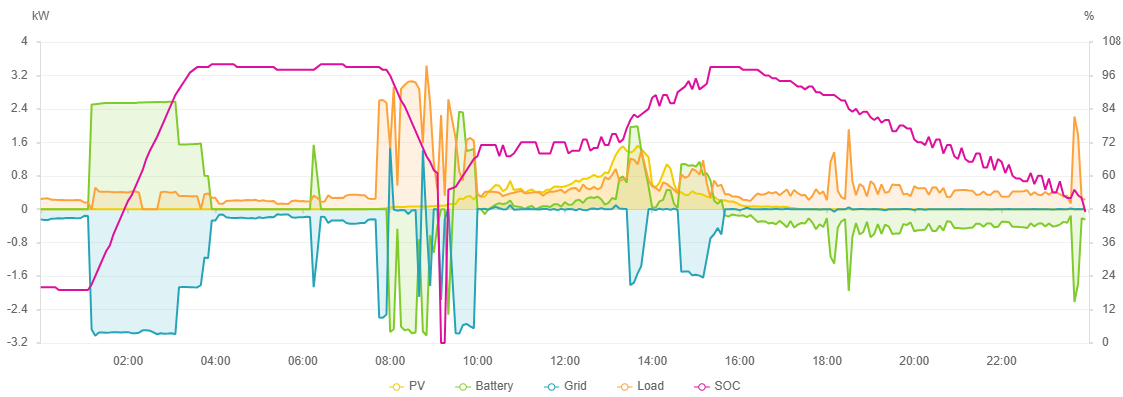
Immediately, I'm drawn to the strategies decided by Solis AI. I thought it would set charging from 02:00 to 08:00 but it stopped charging at 04:30 with the battery at 95% and went into battery Standby until 08:00. The reasoning given is obvious when you think about it. It thinks no more than 95% will be needed for the rest of the day so we can avoid cycling the battery that extra 5% and let the grid take care of the load directly, at cheap rates, until 08:00. I'm impressed. It hasn't had any learning time yet but already seems to have made sensible calls that would have taken me time to assess and implement. I look forward to seeing what it can do going forward. I'm particularly interested to see what it might do to avoid potential clipping coming into the summer months. I'd be grateful for any helpful observations.

Thursday, 1 May 2025

Sage 50 SDO field names not necessarily the same as the ODBC names

A heads up, when working with Sage Data Objects, the field names are not necessarily the same as those recognised in ODBC queries. For example, the AUDIT_SPLIT table has a field called EXTRA_REF when using the ODBC driver which is called INTERNAL_REF in Sage Data Objects. Check out the SDO help file documentation if the expected field name (the ODBC name) doesn't work.

Thursday, 30 January 2025

PV bloopers by the "professionals" - Part 2

Having installed an Economy 7 (2 import and one export tariff) meter I arranged for an additional 3.6kWh Dyness battery to be added to my existing two battery array. Here's the day of the install:


The irregular State Of Charge % trace bothered me but I thought it might take some time for the batteries to "balance". Anyway, I got up in the middle of the night when the inverter was due to draw cheap electricity from the grid and this is what I found:


At around 1AM, when the inverter started its battery charging cycle, the load changed from around 0.2kW to around 1.4kW.  Something was very wrong. After researching the configuration of the battery stack, I discovered that the installer had configured them as 2 Master units and 1 Slave unit instead of 1 Master and 2 Slave units. This I fixed.

I dread to think of the consequences if this error had gone unchecked. Could the inverter or batteries have been irreparably damaged? Would there have been a significant financial penalty? I've resolved to always check what the "professionals" have done to the best of my ability. 0 for 2 (in American parlance) isn't very reassuring.

PV bloopers by the "professionals" - Part 1

I decided my solar panel setup could do with the help of an additional battery together with changing my tariff to Economy 7 (cheap nighttime electricity). I'd been drawing from the grid at night for a short time to get a feel for how it would all work. A meter change was required and an appointment was booked for the installation. 

Some time around 6 PM on the day of installation I went to my SolisCloud app. To my horror this is what I found:


Massive movements, something wasn't right. When I checked the meter I found that a clamp on one of the leads that reports import/export volumes to the system had been replaced the wrong way round! Put the clamp back the way it should be and, voila, back to normal:
Very disappointing. I dread to think of the consequences if I hadn't spotted the issue fairly quickly.

Wednesday, 25 May 2022

Microsoft Office UK/US language confusion

I've been having a nightmare with dates and spelling showing as US format. Here are my Windows settings:
and, here are my Office settings:
I wondered which sort of English that might be and so clicked on the “Add a Language” button to add “English (United Kingdom)”. This resulted in a changed display where “English” was replaced by “English (United Kingdom)”. 

I think most systems will be set to “Match Microsoft Windows [English]”. In spite of saying it matches Microsoft Windows, it doesn’t actually match the UK bit of the Windows setting and, instead, uses US English! 

Now that it reads “Match Microsoft Windows [English (United Kingdom)]”, I'm getting what I want. How confusing is that?

Wednesday, 16 June 2021

Excel High CPU Usage


My laptop sounded like it was working hard so I opened up Task Manager in Windows to see what was going on and, to my surprise, I found that Excel was reporting greater than 50% CPU usage. Permanently it would seem. After a lot of blind alleys I eventually discovered that the zoom setting on the tabs seemed to be the critical factor. At 100% zoom on all 12 tabs the CPU problem persisted. Setting them all to 90% zoom seemed to make the problem marginally worse (approaching 60% CPU usage). Setting them all to 80% zoom seemed to make the problem go away. 

Searching for what might be the issue, I noted that freeze panes was active on one of the sheets such that the scrolling part of the screen was only just visible at 80% zoom. Trial and error determined that the scrolling part of the screen disappeared at 82% zoom and that was the exact zoom level that the CPU usage problem occurred. I removed freeze panes from the sheet and set the ScrollArea in worksheet properties to achieve the same sort of "locked area" effect that freeze panes was used to create and had a usable workbook again.

Tuesday, 23 June 2020

Trouble with Time (Text ODBC driver)


I have a text file with Date and Time fields containing the values 01/01/2020 and, for the time field, 13:00:22

In Microsoft Query the values show as 2020-01-01 00:00:00 and 1899-12-30 13:00:22

When returned from MS Query to appropriately formatted columns in a Query Table they show as 01/01/2020 and 00:00:00

However, if I create a DateTime field as Date+Time it shows as 01/01/2020 13:00:22

How to get the Time to show correctly in the Query Table?

Time + 2 as [Time]

This shows as 13:00:22 in the Query Table. Took me ages to figure this out. I spent ages playing around with the DateTimeFormat option in the Schema.ini to no avail. It seems that if MS Query returns anything prior to 01/01/1900 00:00:00 the time portion will always show as 00:00:00 in Excel


Thursday, 16 February 2017

Excel 2016 version 1612 change

Following the release of the Microsoft Office 365 update to Excel 2016 version 1612 (January 25, 2017), there has been a change in Excel’s default behaviour in relation to PivotTable subtotals when a new field is created following a Group operation. Until now, the new field has been created with the subtotals set to “None”. Now, the new field will be created with the subtotals set to “Automatic”.


I haven’t checked whether the same change occurs with subscription versions of Excel 2013.

Friday, 23 September 2016

Windows 10 Anniversary Update (1607) and problems with Excel

Some Microsoft Windows 10 users have recently been reporting that their Microsoft Excel either crashes or hangs regularly, particularly after the Windows 10 Anniversary Update to version 1607 in August 2016.

The issue can often be traced to printer driver incompatibilities with Windows 10 which affect the correct operation of Excel. Correct operation of Excel can usually be restored by temporarily setting your "Default" printer driver to either "Microsoft Print to PDF" or "Microsoft XPS Document Writer" until you can obtain a Windows 10 compatible printer driver from your printer manufacturer.


HP Laserjet users can find the "Recommended Solution" for their printer model at http://h20564.www2.hp.com/hpsc/doc/public/display?docId=emr_na-c04675396.

Wednesday, 3 June 2015

[Microsoft] [ODBC Text Driver] Too few parameters. Expected:1

I had a complex query that returned the above error intermittently. It turned out that one of the fields was DATE (upper case) as specified in the schema.ini file for the text file. The query referred to Date (proper case). When the query was changed to refer to DATE (upper case) throughout, the intermittent failures stopped.

Tuesday, 7 April 2015

What does PivotCache.OptimizeCache do?

After much searching in vain I finally came across this nugget of an explanation:

PivotCache::OptimizeCache Optimize storage for fields with less than or equal to 255 items

It is buried in the innards of a file explaining changes introduced in Excel 97. Here's the link to the file if you want to see it for yourself: Excel 97 Product Enhancements Guide‎

I presume this means that a different internal indexing mechanism is used in the cache if a byte is big enough to reference all the unique data occurences in a field.

Wednesday, 4 March 2015

Automated email reminders for customers on Sage Line 50 / Sage Instant

The good thing is that, if you already have Excel, this will cost you nothing. The idea goes like this:

  • In the Memo field in the Sage Customer Record, start a dedicated line with something like "#Service date:" and then enter, say, 0630 for the 30th of June each year.
  • Run an Excel macro periodically to identify and automatically email customers where the Memo field indicates that the next service is due soon.

SMS messages are possible too, but you may need to pay for each message sent.

Please drop me a note if you are interested in the Excel file that will facilitate this functionality.


Thursday, 12 February 2015

Import into Sage from Excel to create a multi-line sales invoice in the Invoicing module

The standard response from most is that if you want to create an invoice in the Invoicing module, then the built in import routines do not allow it, so you'd need a 3rd party import program. You can import the invoice as a transaction to the Audit Trail using the Audit Trail Excel import template though.

However, there is a way to create an invoice in the Invoicing module using standard Sage routines - just not using the Excel import templates supplied by Sage. Sage help files outline the process whereby sales invoices can be created in either Sage Line 50 or Sage Instant here. Whilst this process requires Sage 50 Accounts Professional to raise a Purchase Order, instead, we can create a "virtual" Sage 50 Accounts Professional Purchase Order using only Excel.

A summary of the process is given below. In the summary, Company B is the company wishing to create multi-line invoices in the Invoicing module.

  • Company A (or someone in Company B) creates a virtual Purchase Order using Excel and sends it using Transaction email to Company B. Company B receives this as a Sales Order.
  • The Sales Order details are matched and updated.
  • Then Transaction Email automatically creates a Sales Invoice in Sage 50 Accounts / Sage Instant.
  • Company B sends this Sales Invoice to Company A using Transaction Email. Company A receives this as a Purchase Invoice.


The folks at Onion Reporting Software have a free Excel template to create the "virtual" Purchase Order needed for this process.

Wednesday, 24 December 2014

OpenCart order notification doesn't identify the customer - Part 2

After the Part 1 post I realised that direct edits to the OpenCart source files were going to be problematic at upgrade time. I'd lose all my previous edits when the upgraded files were copied over the edited ones. I'd seen references to vQmod but had never fully understood what it was or how it worked. A little investigation revealed that it was an elegant solution to making modificatons to the site that would not be lost on upgrade. I decided to adopt vQmod as my method of preference for adjustments to my OpenCart site.

I installed vQmod to the root directory of my site in accordance with the simple instructions. I already knew the information I needed to get the job done (see the Part 1 post). The file is identified in blue below. The line in that file which is to be replaced is coloured red below. The replacement I want for that line is coloured green below. The rest of the code is as per the guidance on the vQmod site.

The only thing I wasn't clear on from the guidance was where to save the file I put the code below into. I decided to call the file add-email-to-order-notification.xml and I uploaded it to the vqmod/xml directory on my site. It seemed like a reasonable guess. It worked

I'd come to understand that vQmod doesn't change any files. It duplicates them in the VQmod cache which are served (if they exist) instead of the core files and any necessary changes are applied from the XML markup in VQmod
I went back to look at order.php to confirm. It still contains the line I'm replacing with the vQmod. So, when order.php gets replaced in my next upgrade, my site should continue to provide me with the customer's email. In effect, the vQmod self-documents my previous editing changes and executes them on the fly.

<?xml version="1.0" encoding="UTF-8"?>
<modification>
<id>Add customer email address to new order notification</id>
<version>1.0</version>
<vqmver>2.5.1</vqmver>
<author>Onion Reporting Software Ltd</author>
<file name="catalog/model/checkout/order.php">
<operation info="
Add customer email address to new order notification">
<search position="replace"><![CDATA[
$text = $language->get('text_new_received') . "\n\n";
]]></search>
<add><![CDATA[
$text = 'You have received an order from customer ' . $order_info['email'] . "\n\n";
]]></add>
</operation>
</file>
</modification>

Saturday, 6 December 2014

Run-time error '1004': Unable to set the Visible property of the PivotItem class

There are two circumstances in which this error will arise when issuing a [PivotItem].Visible = True command in Visual Basic:


  1. The sort order of the PivotField containing the PivotItem is set to anything other than xlManual; and,
  2. The ShowAllItems value of the PivotField containing the PivotItem is set to False and an attempt is made to set a PivotItem containing no data (i.e. [PivotItem].RecordCount = 0) to True.
To process [PivotItem].Visible = True safely you should issue the following commands first:

[PivotField].AutoSort xlManual, [PivotField].SourceName
[PivotField].ShowAllItems = True


Tuesday, 18 November 2014

Sage Line 50 / Instant month end reporting using Onion Reporting Software's Onion product

One of the issues users frequently ask about is how they can monitor any “back postings” made in Sage since their previous monthly reporting cycle.  For example, a business may have a reporting cycle that produces reports for a month end five working days after that month end.  Using Onion as the reporting option will produce month by month spend figures for each month in the year to date as at working day five of the new month.  If, on working day six of the new month, a late posting is made to the previous month, how is the user of the Onion reporting pack next month to be made aware of the prior month posting?

The [Onion info] sheet of each Onion workbook records the “Last transaction number” at the time of workbook creation.  This identifies the cut-off point for the reporting pack.  The next time an Onion workbook is created, the user can ask to have postings made after that cut-off point identified in the new Onion workbook. The user ticks a check box, provides the last transaction number from the previous reporting pack, and runs the report. On completion the user can set the NEW_POST filter on the [TB Pivot (YTD)] sheet to Y to see what months have been posted to since the last report. Double clicks on the month totals will show the transaction detail of what was posted.

Tuesday, 30 September 2014

Excel VBA range find method not working

Just beat my head off a brick wall for the best part of a day on this!

The Find method failed to locate the reference of a text value in a row because I had hidden the row. I was using LookIn:=xlValues. When I changed it to LookIn:=xlFormulas, it worked as expected. Who knew!

P.S. Excel 2003 - don't know about other versions.

Thursday, 7 August 2014

Adding Debits and Credits in Excel without a helper column

Irritatingly, I keep coming across exports from accounting systems where the figures are always stated as absolute amounts with a separate column showing Dr or Cr to indicate the signage, Dr being + and Cr being -.

It isn't always convenient to add a helper column but a formula in the form of 
=SUMIF($A$1:$A$10,"Dr",$B$1:$B$10) -SUMIF($A$1:$A$10,"Cr",$B$1:$B$10) will subtract the sum of all the Cr values in column B from the sum of the Dr values in column B based on the Dr/Cr designations in column A.

I've noted that the range for SUMIF isn't necessarily a single column array. So, if you had Dr/Cr designators in columns A and C and amounts in columns B and D the formula could have the form =SUMIF($A$1:$C$10,"Dr",$B$1:$D$10) -SUMIF($A$1:$C$10,"Cr",$B$1:$D$10).